

Framework
Global Presets UI Style Guide
01. Color palette
In this part of the style guide, you can modify each color inside the Text Module’s background settings. Use that same color code inside the Text Module below it to have a written version of the color code too. Use these color codes inside your Divi Theme Builder default color palette afterward.
#FFFFFF
#F9F9F9
#f2f2f2
#e0e0e0
#444444
#000000
#F9F9F9
#e0e0e0
#444444
#000000
02. Text styles
In the second part of this style guide wireframe, you can style your different text types. You’re also provided with a primary, secondary and tertiary option, each of which you can afterwards turn into individual presets.
Entrevista Espai Empresa
Header 1 Edit or remove this text inline or in the module Content settings.
Edit or remove this text inline or in the module Content settings. You can also style every aspect of this content in the module Design settings and even apply custom CSS to this text in the module Advanced settings.
Header 2 Edit or remove this text inline or in the module Content settings.
Edit or remove this text inline or in the module Content settings. You can also style every aspect of this content in the module Design settings and even apply custom CSS to this text in the module Advanced settings.
Header 3 Edit or remove this text inline or in the module Content settings.
Edit or remove this text inline or in the module Content settings. You can also style every aspect of this content in the module Design settings and even apply custom CSS to this text in the module Advanced settings.
Header 4 Edit or remove this text inline or in the module Content settings.
Edit or remove this text inline or in the module Content settings. You can also style every aspect of this content in the module Design settings and even apply custom CSS to this text in the module Advanced settings.
Header 5 Edit or remove this text inline or in the module Content settings.
Edit or remove this text inline or in the module Content settings. You can also style every aspect of this content in the module Design settings and even apply custom CSS to this text in the module Advanced settings.
Header 6 Edit or remove this text inline or in the module Content settings.
Edit or remove this text inline or in the module Content settings. You can also style every aspect of this content in the module Design settings and even apply custom CSS to this text in the module Advanced settings.
List
- Edit or remove this text inline or in the module Content settings.
- You can also style every aspect of this content in the module
- Design settings and even apply custom
- CSS to this text in the module Advanced settings.
Links
Primary
Secondary
Tertiary
Heading 1
Heading 1
Heading 1
Heading 1
Heading 2
Heading 2
Heading 2
Heading 2
Heading 3
Heading 3
Heading 3
Heading 3
Heading 4
Heading 4
Heading 4
Heading 4
Heading 5
Heading 5
Heading 5
Heading 5
Heading 4
Heading 6
Heading 6
Heading 6
Body
Lorem ipsum dolor sit amet, consectetur adipiscing elit, sed do eiusmod tempor incididunt ut labore et dolore magna aliqua. Ut enim ad minim veniam, quis nostrud exercitation ullamco laboris nisi ut aliquip ex ea commodo consequat.
Lorem ipsum dolor sit amet, consectetur adipiscing elit, sed do eiusmod tempor incididunt ut labore et dolore magna aliqua. Ut enim ad minim veniam, quis nostrud exercitation ullamco laboris nisi ut aliquip ex ea commodo consequat.
Lorem ipsum dolor sit amet, consectetur adipiscing elit, sed do eiusmod tempor incididunt ut labore et dolore magna aliqua. Ut enim ad minim veniam, quis nostrud exercitation ullamco laboris nisi ut aliquip ex ea commodo consequat.
List
- Lorum Ipsum
- Lorum Ipsum
- Lorum Ipsum
- Lorum Ipsum
- Lorum Ipsum
- Lorum Ipsum
- Lorum Ipsum
- Lorum Ipsum
- Lorum Ipsum
All in one
Heading 1
Heading 2
Heading 3
Heading 4
Lorum ipsum dolor sit amet.
- Lorum Ipsum
Heading 1
Heading 2
Heading 3
Heading 4
Lorum ipsum dolor sit amet.
- Lorum Ipsum
Heading 1
Heading 2
Heading 3
Heading 4
Lorum ipsum dolor sit amet.
- Lorum Ipsum
03. Modules
The last part of this style guide handles some of the most-used modules inside Divi. Here, we’re also providing you with a primary, secondary and tertiary version of each module which you can style and add as a global preset. Feel free to create more alternative designs for each module.
Primary
Secondary
Tertiary
Button
Blurb

Your Title Goes Here
Your content goes here. Edit or remove this text inline or in the module Content settings. You can also style every aspect of this content in the module Design settings and even apply custom CSS to this text in the module Advanced settings.
Your Title Goes Here
Your content goes here. Edit or remove this text inline or in the module Content settings. You can also style every aspect of this content in the module Design settings and even apply custom CSS to this text in the module Advanced settings.
Your Title Goes Here
Your content goes here. Edit or remove this text inline or in the module Content settings. You can also style every aspect of this content in the module Design settings and even apply custom CSS to this text in the module Advanced settings.
Email optin
Contact form
Image
Call to action
Your Title Goes Here
Your content goes here. Edit or remove this text inline or in the module Content settings. You can also style every aspect of this content in the module Design settings and even apply custom CSS to this text in the module Advanced settings.
Your Title Goes Here
Your content goes here. Edit or remove this text inline or in the module Content settings. You can also style every aspect of this content in the module Design settings and even apply custom CSS to this text in the module Advanced settings.
Your Title Goes Here
Your content goes here. Edit or remove this text inline or in the module Content settings. You can also style every aspect of this content in the module Design settings and even apply custom CSS to this text in the module Advanced settings.
Divider
Person

Name Goes Here
Position
Your content goes here. Edit or remove this text inline or in the module Content settings. You can also style every aspect of this content in the module Design settings and even apply custom CSS to this text in the module Advanced settings.
Name Goes Here
Position
Your content goes here. Edit or remove this text inline or in the module Content settings. You can also style every aspect of this content in the module Design settings and even apply custom CSS to this text in the module Advanced settings.
Name Goes Here
Position
Your content goes here. Edit or remove this text inline or in the module Content settings. You can also style every aspect of this content in the module Design settings and even apply custom CSS to this text in the module Advanced settings.
Social Media Follow
Toggle
Your Title Goes Here
Your content goes here. Edit or remove this text inline or in the module Content settings. You can also style every aspect of this content in the module Design settings and even apply custom CSS to this text in the module Advanced settings.
Your Title Goes Here
Your content goes here. Edit or remove this text inline or in the module Content settings. You can also style every aspect of this content in the module Design settings and even apply custom CSS to this text in the module Advanced settings.
Your Title Goes Here
Your content goes here. Edit or remove this text inline or in the module Content settings. You can also style every aspect of this content in the module Design settings and even apply custom CSS to this text in the module Advanced settings.
Testimonial
Your content goes here. Edit or remove this text inline or in the module Content settings. You can also style every aspect of this content in the module Design settings and even apply custom CSS to this text in the module Advanced settings.
Your content goes here. Edit or remove this text inline or in the module Content settings. You can also style every aspect of this content in the module Design settings and even apply custom CSS to this text in the module Advanced settings.
Your content goes here. Edit or remove this text inline or in the module Content settings. You can also style every aspect of this content in the module Design settings and even apply custom CSS to this text in the module Advanced settings.
Video
Accordion
Your Title Goes Here
Your content goes here. Edit or remove this text inline or in the module Content settings. You can also style every aspect of this content in the module Design settings and even apply custom CSS to this text in the module Advanced settings.
Your Title Goes Here
Your content goes here. Edit or remove this text inline or in the module Content settings. You can also style every aspect of this content in the module Design settings and even apply custom CSS to this text in the module Advanced settings.
Your Title Goes Here
Your content goes here. Edit or remove this text inline or in the module Content settings. You can also style every aspect of this content in the module Design settings and even apply custom CSS to this text in the module Advanced settings.
Your Title Goes Here
Your content goes here. Edit or remove this text inline or in the module Content settings. You can also style every aspect of this content in the module Design settings and even apply custom CSS to this text in the module Advanced settings.
Your Title Goes Here
Your content goes here. Edit or remove this text inline or in the module Content settings. You can also style every aspect of this content in the module Design settings and even apply custom CSS to this text in the module Advanced settings.
Your Title Goes Here
Your content goes here. Edit or remove this text inline or in the module Content settings. You can also style every aspect of this content in the module Design settings and even apply custom CSS to this text in the module Advanced settings.
Blog
No Results Found
The page you requested could not be found. Try refining your search, or use the navigation above to locate the post.

Macro Networking
La Unió empresarial de l�Anoia i el facebook per pimes www.grera.net, i amb la col•laboració de 11 associacions empresarials més, et conviden a participar al primer macro networking on faràs més de 50 contactes empresarials.

Macro Networking Catalunya, més de 95 empreses d� arreu de Catalunya fan contactes a Igualada
El macronetworking que va acollir l´Anoia va ser un èxit de participació . Uns 90 empresaris provinents de tot Catalunya van reunir-se a Sesoliveres on van poder fer una gran quantitat de contactes al llarg de tot el dia.

I concurs d� emprenedors Craft-EFM
Emprenedors… esteu farts de sol•licitar ajuts i subvencions que mai no arriben??
Necessiteu que us donin la mà per decidir-vos a iniciar el vostre projecte empresarial??
Heu iniciat el vostre projecte durant el 2011 i necessiteu un impuls per donar-lo a conèixer??
Si us trobeu en alguna de aquestes situacions … aquí usarriben per fi notícies bones i fresques!!!

Cursos d� idiomes, últimes places
Cursos de Formació Ocupacional, destinada prioritàriament a persones en situació d� atur
Últimes places dels següents cursos:

Treballadors en pràctiques
TREBALLADORS EN PRÀCTIQUES
Sense cap cost per l�empresa
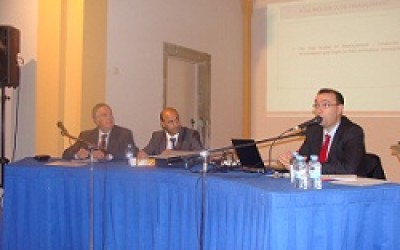
La UEA realitza, a Calaf, una conferència sobre com negociar amb els bancs
L´acte, es va realitzar al Centre de Recursos per a l´Ocupació i va comptar amb la col.laboració de l´Ajuntament de Calaf

ACI (Associació del comerç i indústria de Vilanova del Camí) s� incorpora a la UEA
El passat dijous dia 3 de novembre es van reunir el president de la Unió Empresarial de l�Anoia , Ramon Felip i Bolba, i el president de l�ACI Assenci Sánchez Tomas. El motiu de la reunió va ser el de...

La UEA romandrà tancada el dia 31 d�octubre

UEA Magazine núm. 26
Ja estem preparant un nou número de la revista UEA MAGAZINE, la revista econòmica i empresarial de la comarca de l´Anoia.
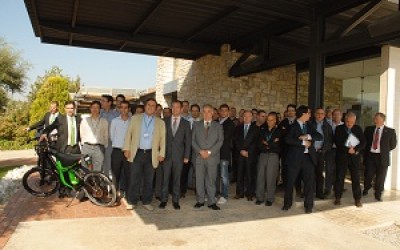
Es presenta la Comarca del Motor, a les empreses del sector de la Moto
La UEA i Cluster Moto organitzen amb èxit la jornada d´immersió de “ClusterMoto” a la nostra Comarca.

El new York Times selecciona el Cava Bohigas Brut Nature com un dels millors vins i caves del món per l´estiu
El prestigiós rotatiu inclou el cava de Bohigas en un reportatge sobre els millors vins i caves de l'estiu per 20 dòlars.
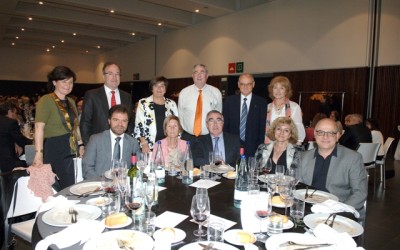
Festa de Germanor i Homenatge al col•legiat de la CETIM
La Festa de Germanor i d'Homenatge del Col·legiat del Col·legi Professional d'Enginyers Tècnics Industrials i Graduats de Manresa, del passat 23 de maig va comptar amb més de 300 assistents entre col·legiats i autoritats entre les...

La problemàtica per la subestació elèctrica avança
Direcció General de l'Energia obre un expedient informatiu per estudiar la problemàtica existent amb la subestació elèctrica de Vilanova del Camí, pel cost que suposa per a les empreses aquesta instal·lació que no...

Els empresaris catalans a favor del dret a decidir
La Unió Empresarial de l'Anoia dóna sport al Manifest anomenat del Far que es va signar el passat 8 de maig al Far de Sant Sebastià adherint-se així al Pacte Nacional pel Dret a decidir.

Acord de col·laboració amb Iguana Comunicacions
L'acord de col·laboració signat entre Iguana Comunicacions
i la Unió Empresarial de l'Anoia permet a tots els associats a la UEA i a tots els agremiats
als diferents gremis professionals del territori gaudir d'importants avantatges en el servei d'Internet amb ample de banda de gran capacitat.

Debat sobre senyalitzacions i mobilitat – La CUMA
Arran de la problemàtica manifestada per la Comissió d'Urbanisme i mobilitat de la UEA, la CUMA, en matèria de senyalitzacions i ordenació del trànsit rodat, el Canal Taronja va dedicar un "Debat de la setmana" a aquest tema amb la...

Instruccions per recuperar el cèntim sanitari
Tots aquells que han hagut de pagar l'impost sobre les Vendes Minoristes de Determinats Hidrocarburs, conegut també com a “cèntim sanitari”, tenen el dret i la possibilitat de sol•licitar-ne la devolució. Com que el ministeri d'Hisenda ha alertat que sancionarà la presentació de sol•licituds “indegudes” o la utilització de dades “incorrectes, inexactes o falses”, és important que tots els usuaris que facin la gestió ho facin degudament a través del formulari online disponible a la pàgina web de l'Agència Tributària espanyola
.
La UEA proposa millores i senyalitzacions en matèria de mobilitat a la comarca
La CUMA, comissió de treball de la UEA, redacta propostes per ordenar i facilitar el trànsit rodat a la Conca d’Òdena, modificacions prioritàries i infraestructures estratègiques a tenir en compte per l’administració.
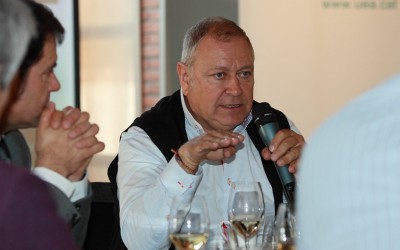
Lloreda:El nostre objectiu és créixer a nivell internacional i ser líders mundials
El passat 6 de març la UEA va organitzar un nou dinar UEA que en aquesta ocasió va comptar amb l'empresari Josep M Lloreda , president de l' empresa KH Lloreda que comercialitza el conegut producte de neteja KH7.

Nou servei gratuït de diagnosi i acompanyament financer
Saps quina és la situació financera de la teva empresa?
Més enllà que sigui bona o dolenta, coneixes les claus per a una bona gestió dels teus recursos? Tens detectats els punts forts i els punts dèbils de la teva gestió? Des de la UEA podem ajudar-te.